Introduction
Last year I created the yfinance-jp-screener repo after reading Investment Strategy and thinking “I’ll try building that.”
When I added US stocks and ran GitHub Actions with a matrix for parallel jobs, I hit:
Failed to CreateArtifact: Artifact storage quota has been hit. Unable to upload any new artifacts.
It was a private repo, so I’d used up the free tier’s artifact storage. I needed to delete artifacts, and I wanted notes for the next time it happens.
GitHub Actions storage pricing (high level)
Free allowances by plan
For private repos, free allowances look like this (official docs):
| Plan | Artifact storage | Minutes / month | Cache |
|---|---|---|---|
| GitHub Free | 500 MB | 2,000 | 10 GB |
| GitHub Pro | 1 GB | 3,000 | 10 GB |
| GitHub Team | 2 GB | 3,000 | 10 GB |
| GitHub Enterprise Cloud | 50 GB | 50,000 | 10 GB |
Notes:
- Artifact, cache, and GitHub Packages storage share the same pool for the account.
- Public repos get free GitHub-hosted runner minutes.
- Usage recalculates every 6–12 hours, so free space after deletes may not show up instantly.
What to do when you’re over quota
1. Delete artifacts manually in the web UI
Fastest way to free space:
- Open the repo’s Actions tab.
- Pick the workflow on the left.
- Open the run you care about.
- Under Artifacts on the right, use the trash icon on each artifact.
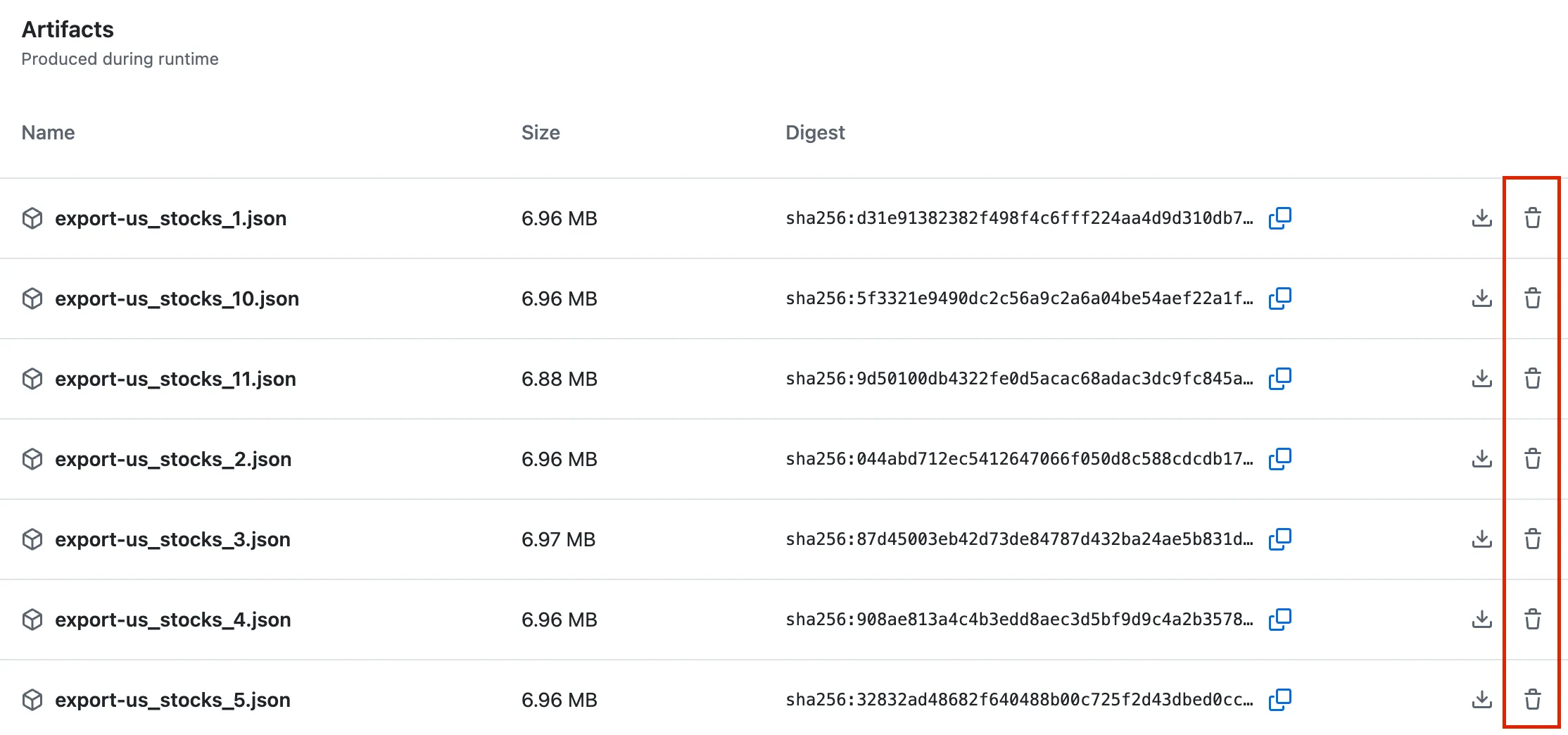
Fine for a handful of artifacts.
2. Bulk-delete old artifacts with c-hive/gha-remove-artifacts
When there are many artifacts, an Action that purges by age helps.
c-hive/gha-remove-artifacts can delete artifacts older than a given age.
Create .github/workflows/remove-old-artifacts.yml:
name: Remove old artifacts

on:
  # schedule:
  # - cron: '0 1 * * *'

  workflow_dispatch:
    inputs:
      artifact_age:
        description: "Delete artifacts older than (e.g. 5 days, 1 month, 2 years)"
        required: false
        default: "1 month"
        type: string

      skip_tags:
        description: "Skip artifacts from tagged releases"
        required: false
        default: "false"
        type: choice
        options:
          - "true"
          - "false"

      skip_recent:
        description: "Skip the newest N artifacts (0 disables)"
        required: false
        default: "5"
        type: string

jobs:
  remove-old-artifacts:
    runs-on: ubuntu-latest
    timeout-minutes: 10

    permissions:
      actions: write

    steps:
      - name: Remove old artifacts
        uses: c-hive/gha-remove-artifacts@v1
        with:
          age: ${{ github.event.inputs.artifact_age || '1 month' }}
          skip-tags: ${{ github.event.inputs.skip_tags || 'false' }}
          skip-recent: ${{ github.event.inputs.skip_recent != '0' && github.event.inputs.skip_recent || '' }}
Caveat: If storage is completely full, new workflows (including this one) may fail to upload logs or artifacts. In that case delete manually in the UI first, or run locally with act (below).
3. Run gha-remove-artifacts locally with act when GHA can’t run
If Actions can’t run at all, act can execute the workflow on your machine against the GitHub API.
Steps (macOS)
- Install act:
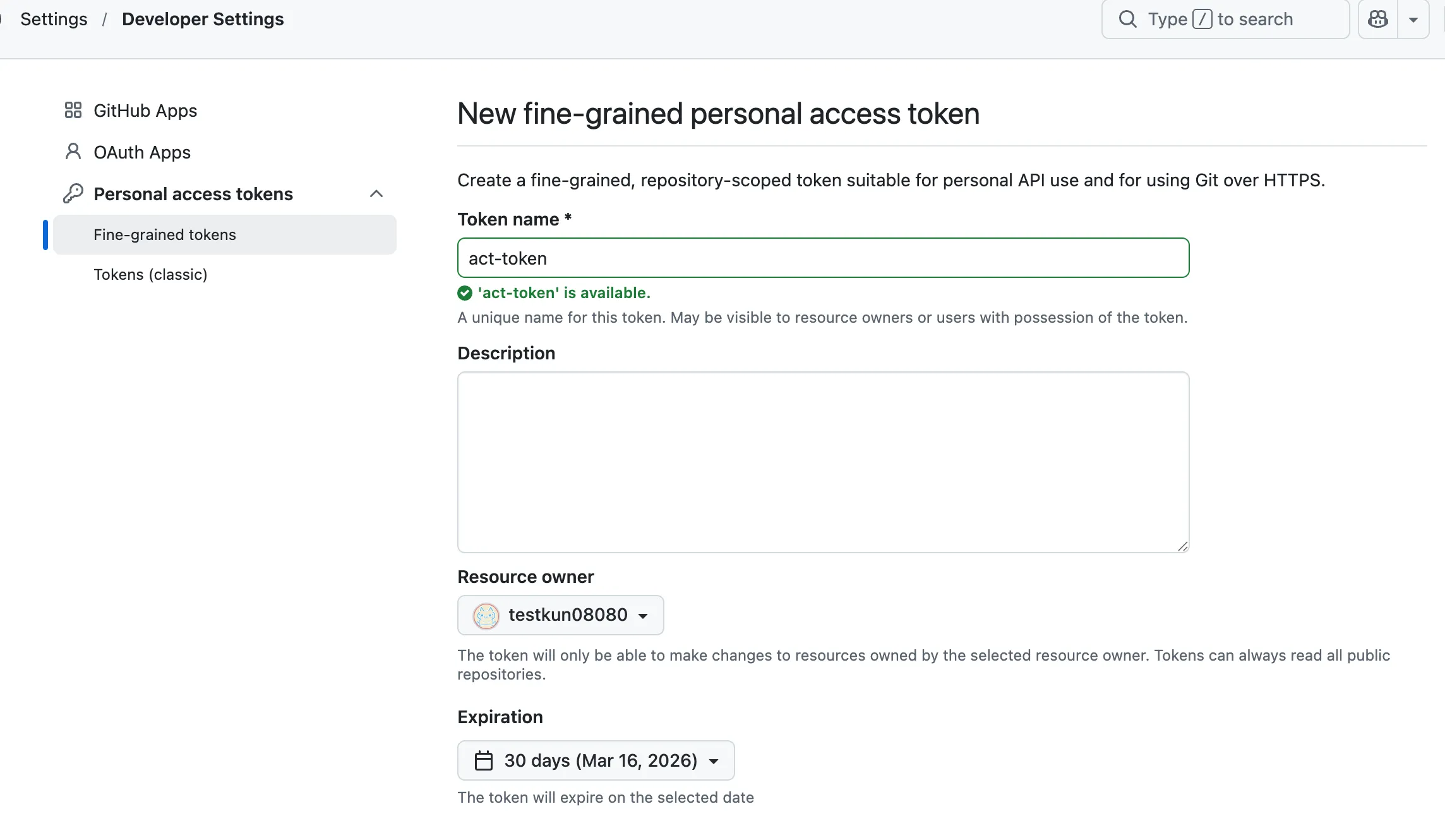
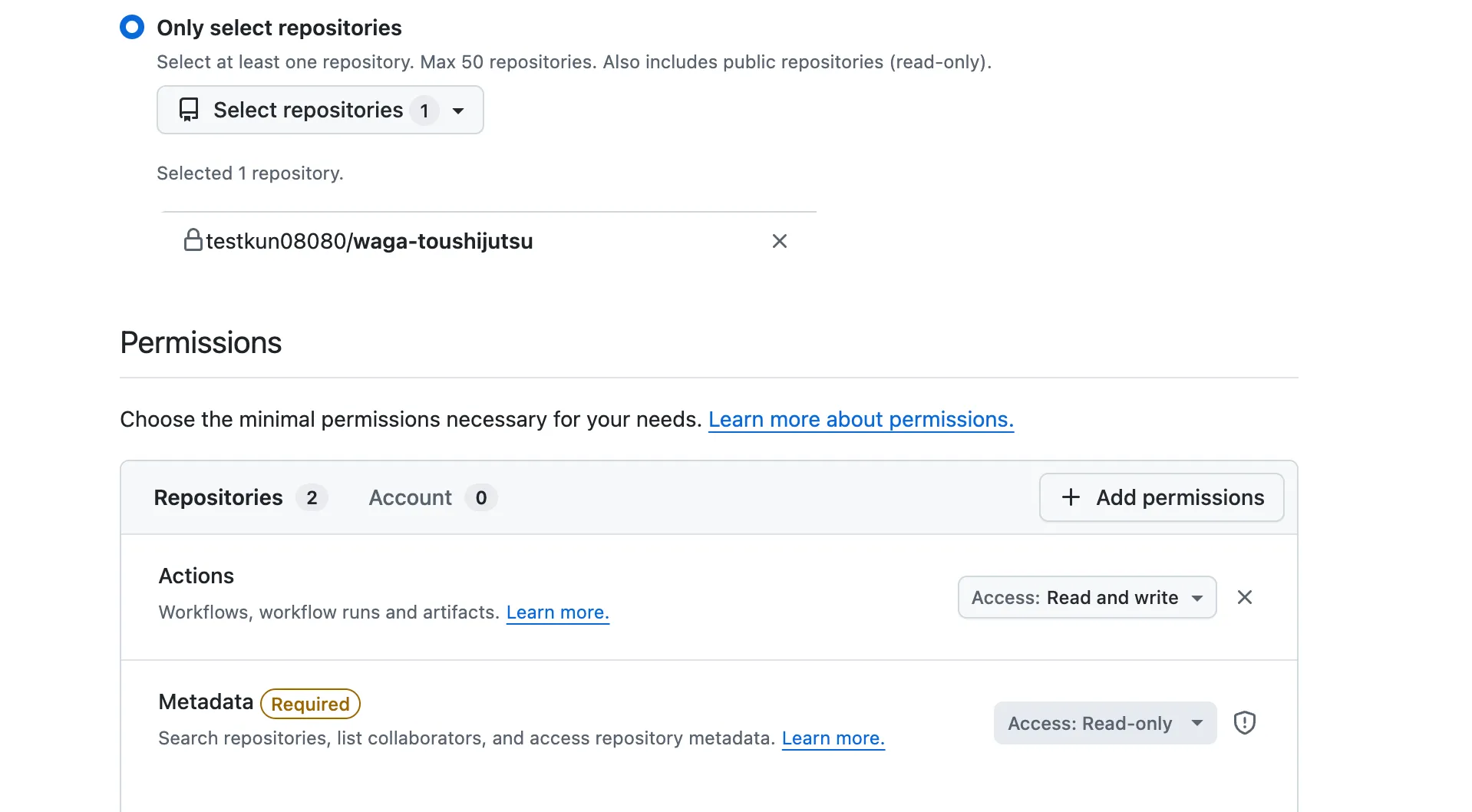
brew install act - Create a PAT under Settings → Developer settings → Personal access tokens (fine-grained is fine). Grant Actions: Read and write for the repo.
- Push the
remove-old-artifacts.ymlworkflow above. - Run:
act push --job remove-old-artifacts -s GITHUB_TOKEN=YOUR_PAT- Optional: workflow_dispatch with inputs — create
.github/events/remove-old-artifacts-dispatch.json:
{
  "inputs": {
    "artifact_age": "5 months",
    "skip_tags": "false",
    "skip_recent": "0"
  }
}act workflow_dispatch \
-e .github/events/remove-old-artifacts-dispatch.json \
--job remove-old-artifacts \
--container-architecture linux/amd64 \
-s GITHUB_TOKEN=YOUR_PATOn Apple Silicon you may need:
--container-architecture linux/amd64Prevention
Default artifact retention is 90 days; shortening it reduces long-term growth.
- Repo Settings → Actions → General
- Under Artifact and log retention, lower the days (e.g. 14).
This applies to new artifacts only — existing ones still need deletion as above.
Summary
| Situation | Approach |
|---|---|
| Delete a few artifacts | Web UI |
| Regular cleanup | c-hive/gha-remove-artifacts on a schedule |
| Nuke old stuff in one go | Same Action with a long age window |
| GHA can’t run | act locally with a PAT |
For data-collection workflows, artifacts pile up fast — set short retention-days or a cleanup workflow early.
Links
- GitHub Actions storage billing
- act
- c-hive/gha-remove-artifacts
- yfinance-jp-screener
- Investment Strategy