I built a PopCat-style meme counter and share game in Flutter, then walked through building for iOS and uploading to TestFlight. This post records what worked.
I only tried iOS here — Android is untested.
Prerequisites
These steps were verified on a MacBook (Apple Silicon).
What you need upfront
- Apple Developer Program membership ($99/year)
- An app registered in App Store Connect (Bundle ID must be set)
- A GitHub account (for a private certificates repository)
- A Flutter project that can run
flutter build ioslocally
Overview
- Install Homebrew and fastlane
- Add a Gemfile under
ios/and set up fastlane with Bundler - Create a private GitHub repo for certificates
- Manage certificates and provisioning profiles with
fastlane match - Create an App Store Connect API key
- Write a
betalane inFastfile - Set environment variables and run locally
Install Homebrew and fastlane
fastlane is a Ruby gem, but installing the Homebrew build first makes CLI tools like fastlane init easier to use.
Day to day, you will mostly run fastlane through Bundler in the project.
Install Homebrew
If you do not have it yet, run the command from the Homebrew site.
/bin/bash -c "$(curl -fsSL https://raw.githubusercontent.com/Homebrew/install/HEAD/install.sh)"Install fastlane
brew install fastlaneCheck the version:
fastlane --versionSet up fastlane in the project
init
Run fastlane init in the ios/ directory.
cd ios
bundle exec fastlane init
You will see options like:
1. 📸 Automate screenshots
2. 👩✈️ Automate beta distribution to TestFlight
3. 🚀 Automate App Store distribution
4. 🛠 Manual setup - manually setup your project to automate your tasksChoose 2. Automate beta distribution to TestFlight.
If prompted to sign in with your Apple account, proceed as directed.
Appfile
Put your app identifiers in ios/fastlane/Appfile.
If init succeeded, these may already be filled in.
app_identifier("com.example.yourapp")
team_id("XXXXXXXXXX")

apple_id(ENV["APP_STORE_CONNECT_APPLE_ID"]) if ENV["APP_STORE_CONNECT_APPLE_ID"]
itc_team_id(ENV["APP_STORE_CONNECT_TEAM_ID"]) if ENV["APP_STORE_CONNECT_TEAM_ID"]
Create a certificates repo on GitHub
match stores certificates and provisioning profiles encrypted in a Git repository.
Use a private repo separate from your app source code.
1. Create a private repository
On GitHub:
- GitHub → New repository
- Name example:
ios-certificates(any name works) - Select Private
Save the URL (e.g. https://github.com/yourname/ios-certificates.git).
This becomes MATCH_GIT_URL.
2. Create a GitHub PAT
match needs a Personal Access Token (PAT) to push and pull from the private repo.
- GitHub → Settings → Developer settings → Personal access tokens
- Fine-grained or Classic is fine
- Grant read/write access to repository Contents
- Copy the token (you cannot view it again)
Base64-encode it for your shell.
Use your GitHub username and the PAT you just created.
echo -n "yourname:ghp_xxxxxxxxxxxx" | base64 | pbcopyThe result is your MATCH_GIT_BASIC_AUTHORIZATION value.
If the command succeeds, it should already be on your clipboard.
3. Generate a Matchfile with match init
From ios/, run:
cd ios
bundle exec fastlane match init
You will be asked for a storage type:
[13:00:02]: fastlane match supports multiple storage modes, please select the one you want to use:
1. git
2. google_cloud
3. s3
4. gitlab_secure_files
Choose 1 (git).
When asked for the Git URL, enter the repo you created earlier.
Also set app_identifier in Matchfile:
app_identifier(["com.example.appname"])Manage code signing with fastlane match
Managing provisioning profiles by hand is tedious, so use match.
It encrypts certificates and profiles in a private Git repo so local machines and CI can share the same signing setup.
First-time setup (appstore)
When the certificates repo is empty, run this once:
cd ios
bundle exec fastlane match appstore
Rough flow:
- Enter an encryption passphrase (new).
This isMATCH_PASSWORD— save it somewhere safe - Sign in with Apple ID, or authenticate with an App Store Connect API key
- match creates a Distribution certificate and App Store provisioning profile in the Apple Developer Portal
- Encrypts and pushes them to your GitHub certificates repo
The first run can take several minutes because of Apple-side work.
Verify in Apple Developer Portal
After match succeeds, Certificates, Identifiers & Profiles should show:
- Certificates:
Apple Distribution(name may includematchor your team name) - Profiles: something like
match AppStore com.example.yourapp
On GitHub, the certificates repo should have commits with encrypted files under certs/, profiles/, and similar paths.
When things go wrong
- “Could not create another Distribution certificate”
You may have hit the Distribution certificate limit (usually two).
Revoke unused old certificates in the Developer Portal, then retry. - 403 on GitHub push
Check PAT scopes and thatMATCH_GIT_BASIC_AUTHORIZATIONis Base64 ofuser:token
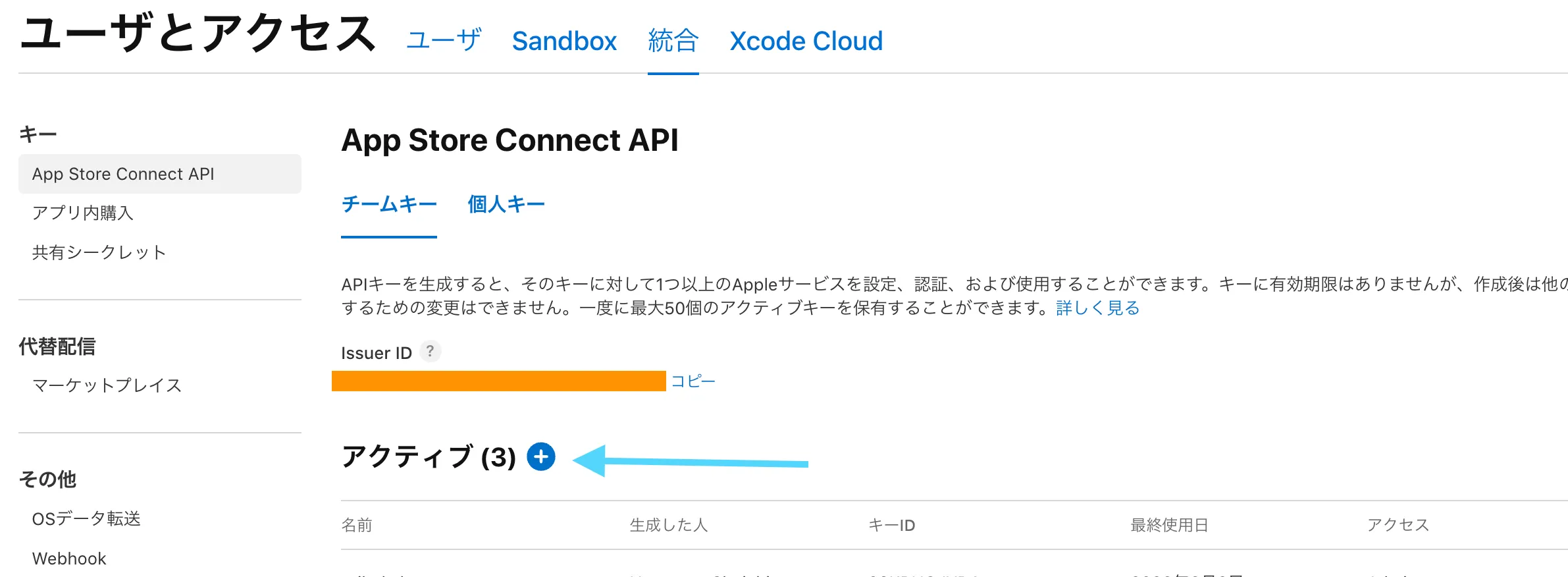
Create an App Store Connect API key
Signing in with Apple ID every time is painful, so use an API key.
- App Store Connect → Users and Access → Keys
- Create a new key (+) with role App Manager
- Download the
.p8file (you can only download it once)
Base64-encode the downloaded .p8:
base64 -i AuthKey_XXXXXXXXXX.p8 | pbcopyThis is APP_STORE_CONNECT_API_KEY_CONTENT.
Write the Fastfile
Here is a minimal ios/fastlane/Fastfile that worked for me.
require "shellwords"

default_platform(:ios)

REPO_ROOT = File.expand_path("../..", __dir__)

def app_store_connect_key
  app_store_connect_api_key(
    key_id: ENV.fetch("APP_STORE_CONNECT_API_KEY_ID"),
    issuer_id: ENV.fetch("APP_STORE_CONNECT_ISSUER_ID"),
    key_content: ENV.fetch("APP_STORE_CONNECT_API_KEY_CONTENT"),
    is_key_content_base64: true,
    in_house: false
  )
end

def repo_sh(*command)
  escaped_command = command.map { |part| Shellwords.escape(part) }.join(" ")
  sh("cd #{Shellwords.escape(REPO_ROOT)} && #{escaped_command}")
end

platform :ios do
  desc "Run Flutter format, analyze, test, and unsigned iOS build"
  lane :ci_checks do
    repo_sh("flutter", "pub", "get")
    repo_sh("dart", "format", "--output=none", "--set-exit-if-changed", "lib", "test")
    repo_sh("flutter", "analyze", "lib", "test")
    repo_sh("flutter", "test")
    repo_sh("flutter", "build", "ios", "--release", "--no-codesign")
  end

  desc "Build a signed IPA and upload to TestFlight"
  lane :beta do
    setup_ci if ENV["CI"]

    api_key = app_store_connect_key

    match(
      type: "appstore",
      readonly: ENV["CI"] == "true",
      team_id: ENV.fetch("APP_STORE_CONNECT_TEAM_ID"),
      git_url: ENV.fetch("MATCH_GIT_URL"),
      api_key: api_key
    )

    update_code_signing_settings(
      use_automatic_signing: false,
      path: "Runner.xcodeproj",
      team_id: ENV.fetch("APP_STORE_CONNECT_TEAM_ID"),
      bundle_identifier: "com.example.yourapp",
      code_sign_identity: "Apple Distribution",
      profile_name: "match AppStore com.example.yourapp"
    )

    build_number = latest_testflight_build_number(api_key: api_key) + 1
    increment_build_number(
      build_number: build_number,
      xcodeproj: "Runner.xcodeproj"
    )

    gym(
      export_method: "app-store",
      clean: true,
      skip_package_dependencies_resolution: true,
    )

    upload_to_testflight(
      api_key: api_key,
      skip_waiting_for_build_processing: true
    )
  end
end
A few notes:
latest_testflight_build_number + 1auto-increments the build number so you rarely collide with TestFlightskip_package_dependencies_resolution: truekeeps fastlane from resolving Flutter SPM on its own. Runningflutter build ios --no-codesignfirst, then calling gym, was more stable for me
Set environment variables
Put a .env file in ios/fastlane/ or export variables in your shell.
If you use .env, add it to .gitignore.
export APP_STORE_CONNECT_APPLE_ID="your@email.com"
export APP_STORE_CONNECT_TEAM_ID="XXXXXXXXXX"
export APP_STORE_CONNECT_API_KEY_ID="XXXXXXXXXX"
export APP_STORE_CONNECT_ISSUER_ID="xxxxxxxx-xxxx-xxxx-xxxx-xxxxxxxxxxxx"
export APP_STORE_CONNECT_API_KEY_CONTENT="LS0tLS1CRUd..."  # base64-encoded
export MATCH_GIT_URL="https://github.com/yourname/ios-certificates.git"
export MATCH_PASSWORD="your-match-passphrase"
export MATCH_GIT_BASIC_AUTHORIZATION="base64(user:token)"  # GitHub PAT
MATCH_GIT_BASIC_AUTHORIZATION is Base64 of user:token with your GitHub PAT.
echo -n "yourname:ghp_xxxxxxxxxxxx" | base64Run locally
From ios/:
cd ios

# Preflight (unsigned build)
fastlane ios ci_checks

# Upload to TestFlight
fastlane ios beta
The first run downloads profiles via match and takes longer.
Later runs are faster because certificates are cached locally.
Common issues
Build number rejected as duplicate
latest_testflight_build_number reads the latest TestFlight build, so + 1 usually avoids collisions.
API lag can still bite you if you upload several builds back to back.
Forgot the match passphrase
Without MATCH_PASSWORD you cannot decrypt the certificates repo.
Store it in a password manager.
Summary
- Keep
MATCH_PASSWORDsomewhere safe — you will need it again - First-time setup is involved, but it templates well for reuse
- Once local runs are stable, moving the same
Fastfileto GitHub Actions is straightforward
Next up: automate deploys from GitHub Actions with the same Fastfile.
→ Deploy Flutter Apps to TestFlight with GitHub Actions
Related links
- Deploy Flutter Apps to TestFlight with GitHub Actions
- fastlane docs
- fastlane match
- Flutter deployment docs
- App Store Connect API