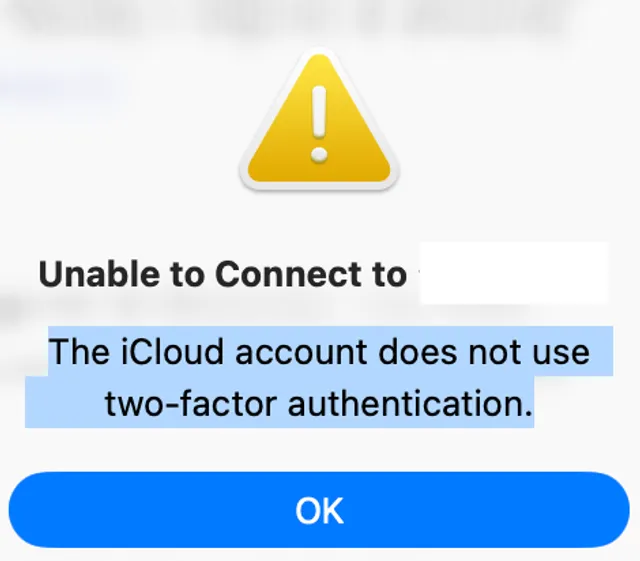
I opened my MacBook at the office as usual and tried to use my iPad as an external display. Then this message appeared and I could not connect:
The iCloud account does not use two-factor authentication.
(Japanese UI equivalent: 「iCloud アカウントは二要素認証を使用していません。」)
I am not sure why it showed up all of a sudden. The only change I remember is changing my Apple Account password. I had re-signed in to the devices I could think of after that.
Even so, something around Sidecar may have been left in a bad state.
This post walks through common Apple Support–style troubleshooting and what finally worked on my setup.
Environment
| Item | Details | OS |
|---|---|---|
| Mac | MacBook Pro (Apple M1 Pro) | Tahoe Version 26.3.1 (a) |
| iPad | iPad Air (4th generation) | 26.3.1 (a) |
OS versions match what the devices showed at the time.
What I tried first (typical official guidance)
For Sidecar and Continuity, Apple documents prerequisites and checks in Use Sidecar on your Mac and related articles. I went through them in roughly this order.
1. Cables and connections
- I was on USB-C, so I swapped cables and tried different ports.
- For wireless Sidecar, I confirmed both devices were on the same Wi-Fi.
2. Confirm two-factor authentication (2FA)
The message points at two-factor authentication for your Apple ID.
- On each device: Settings → your name (Apple Account) → Sign-In & Security (names vary by OS) and verify Two-Factor Authentication is on.
On my devices, 2FA was already on, but Sidecar still behaved as if something was stale.
3. Same Apple Account on both devices
I confirmed Mac and iPad were signed in to the same Apple Account.
4. Wi-Fi, Bluetooth, and Handoff
- Toggle Bluetooth off and on.
- Check Handoff on the Mac (e.g. General → AirDrop & Handoff).
- Confirm Internet Sharing is not interfering (often listed as a requirement in Apple’s docs).
5. Restart
I restarted both the Mac and the iPad. Simple, but often effective for connectivity.
6. Software updates
I checked for macOS and iPadOS updates and kept them reasonably current.
None of that restored Sidecar for me. The error stayed and the iPad would not work as a display.
What fixed it: sign out on both, then sign in again
The step that worked was signing out of my Apple Account on both the MacBook and the iPad, then signing in again.
- Mac: Sign out of your Apple Account (follow prompts if you need to keep copies of data).
- iPad: Sign out the same way.
- Sign back in on one device, then the other, with the same account.
Signing out can trigger iCloud data and on-device content prompts; read Apple’s guidance and back up anything you cannot afford to lose.
After that, Sidecar recognized the iPad as an external display again and the error message stopped.
Summary
- “The iCloud account does not use two-factor authentication.” appeared even though 2FA was enabled; Sidecar stopped working.
- Cable checks, 2FA verification, same Apple ID, connectivity, restarts, and updates did not fix it in my case.
- Signing out on both Mac and iPad, then signing back in restored the connection.
I cannot prove the password change alone caused it, but a mismatch between local sign-in state and Apple’s security settings can explain misleading messages. If you see the same error, add this to your list of things to try.
References
- Use Sidecar on your Mac - Apple Support
- System requirements for Continuity on Mac and Apple devices - Apple Support
- Two-factor authentication for Apple ID - Apple Support