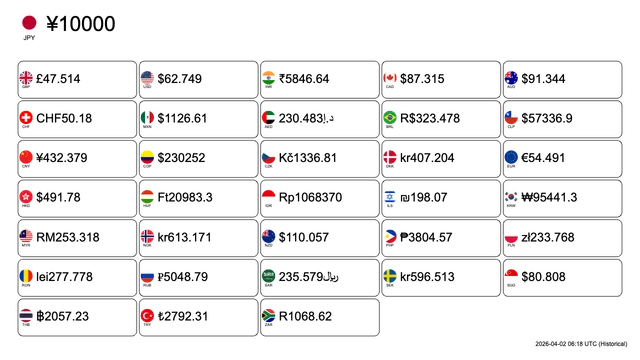
“I spend about an hour making this currency rate image…”
That was my pain back when I was making travel Vlogs.
My pain during the travel Vlog era
Around 2023, travel-related content was extremely popular—and I was riding that wave on YouTube as well.
When you’re showing viewers multiple countries, you often need to insert images that convert costs and expenses into multiple currencies so they’re easy to understand.
Back then: a nightmare manual workflow
At the time, there was no tool that could let me arrange multiple currencies clearly, then make it easy to apply real-time (and historical) rates and export the result as an image.
So I ended up doing things like this:
- Check exchange rates with Python (or similar)
- Recalculate using those rates
- Open it in Illustrator and handle the layout
- Create text boxes and type everything manually
- Adjust fonts, sizes, and colors
- Export the image
And I repeated this 3 to 4 times per video.
If I noticed something was wrong…
then it turned into a loop of recalculation → remake right before uploading.
The reason I stuck with Wise
I’m a Wise user.
When I started making international transfers personally, I got fed up with bank transfer fees—and I was hooked by Wise’s transparent rates and low fees.
Or rather, there was no real option besides using Wise.
- Bank transfer fees: 3,000–5,000 yen (approx.)
- Wise (formerly TransferWise) fees: 200–500 yen (approx.)
With the same transfer amount, that’s roughly an 80–95% fee reduction, depending on the bank and amount.
So I kept using Wise.
And I thought:
“If something like Wise—real-time and accurate exchange rates—could be offered in a way travel creators can easily use, wouldn’t more people enjoy it?”
Currency Converter Board — Turning a “what I really wanted” into a product for creators
That’s how Currency Converter Board was born.
Main features
1. Pick freely from 250+ currencies
USD, EUR, GBP, JPY, CNY, INR, KRW, THB, VND…
Of course it covers major currencies, and it also supports niche ones. For example: “I’m going to Laos, so I need LAK (Laos Kip).”
2. Export instantly as an image
The rate board for the currencies you pick can be exported as PNG/JPG directly.
Just paste it into your video editor, blog, or SNS. No need to open Figma.
3. Real-time exchange rates + historical rates by date
Because Wise API is used in the background, it can always fetch the latest rates.
And you can also go back to historical rates, like “the rate from this day last year.”
You can recreate your trip memories with the rates from that time.
4. Drag-and-drop to reorder currencies
You can customize the order freely. Bringing important currencies to the top improves visibility and lets you control the reading flow.
5. Output size and design adjustments
- Output image size (aspect ratio)
- Card border line thickness
- Color styling
You can generate outputs that match YouTube thumbnail size or your blog content width.
6. Embed it on other sites with iframe
To support the need like: “I want to update the currency rates on this blog once a month,” it also provides an iframe embed.
When you embed it, the rates update automatically in real time.
Target users
Currency Converter Board is designed for:
- Travel Vlog creators / YouTubers → currency comparison visuals for video
- Travel bloggers → embedded rate boards in blog posts
- Website operators → currency information for customers
- Individuals who handle international transfers → quick real-time rate checking
- Finance/economy media → exchange rate widget
Monetization: using Wise affiliate income to cover the running cost
This is a free tool.
I wanted to provide it free for as many people as possible, and I didn’t feel comfortable making it paid from day one.
So on the backend, I use the Wise affiliate program.
How it works
- Users view currency rates on Currency Converter Board
- If they realize “Wow, this is actually cheaper,” they register via the Wise affiliate link
- Users execute the international transfer
- Fee discounts or cashback based on the transfer amount ← Wise affiliate earnings
- Use that revenue to cover the tool’s operating costs
Example use cases — How travel creators can use it
Scenario 1: YouTube video
When making a Thailand travel video:
- Select multiple currencies like JPY / THB / USD / EUR on Currency Converter Board
- Enter your base amount, e.g. “10,000 THB for three days in Thailand”
- Generate an image that instantly shows what that means in your base currency (yen, in this example)
- Embed it as an image in your video
- Viewers notice “Oh, Wise can transfer cheaply”
- Click through to Wise and sign up → affiliate reward may apply
Example of the output image
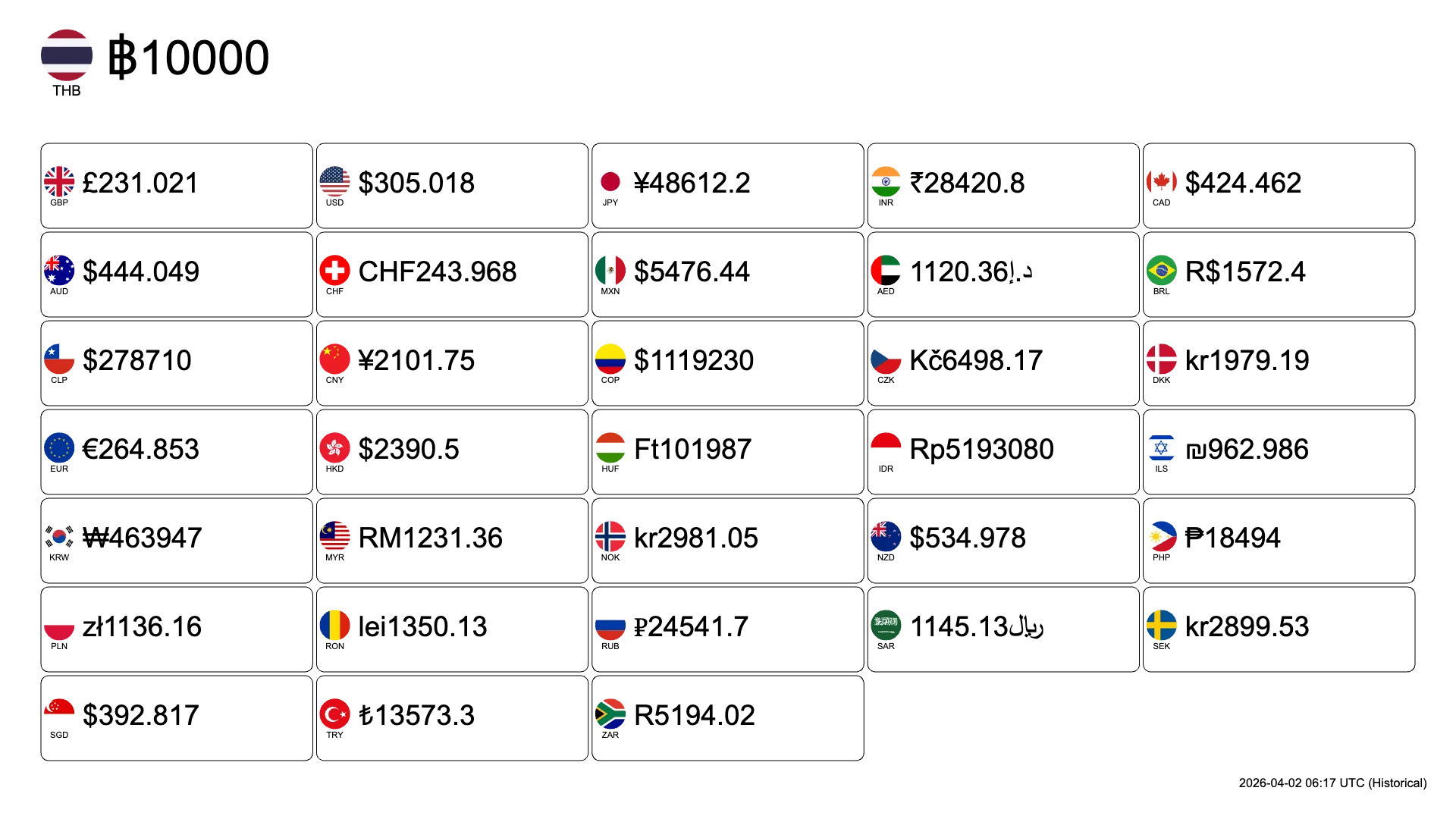
In this case, affiliate rewards would apply to the YouTuber—not to me.
But if you spread the tool, and if you ever decide to pay to use it in the future, monthly support or donations would be appreciated.
Scenario 2: A travel blog post
If your post is like: “How much did the Vietnam trip cost in total?”
Vietnam trip total: 5,000,000 VND (₫)
You can embed it using an iframe like this:
<iframe
  src="https://currency-converter-board.com/embed?amount=5000000&from=VND&targets=JPY%2CGBP%2CUSD%2CINR%2CCAD%2CAUD%2CCHF%2CMXN%2CAED%2CBRL%2CCLP%2CCNY%2CCOP%2CCZK%2CDKK%2CEUR%2CHKD%2CHUF%2CIDR%2CILS%2CKRW%2CMYR%2CNOK%2CNZD%2CPHP%2CPLN%2CRON%2CRUB%2CSAR%2CSEK%2CSGD%2CTHB%2CTRY%2CZAR"
  width="100%"
  style="border:0;display:block;width:100%;height:0;overflow:hidden;"
  scrolling="no"
  frameborder="0"
  title="Currency Converter Board"
  name="ccb-e2al12ms"
  data-ccb-resize-id="ccb-e2al12ms"
></iframe>
<script src="https://currency-converter-board.com/embed-resize.js"></script>
These are the rates for converting 5,000,000 VND (₫) into each currency:
If it feels “significantly cheaper than bank remittance,” consider sending money with Wise.
In this flow, readers may also see that there’s an affiliate link inside the iframe—so there’s a chance rewards apply to me too (win-win).
Technical background — How this became possible
This feels very “of the current era,” and I think that’s part of it.
You collect information, feed it to AI, and you can get to a working “first version” pretty quickly.
Even without web development knowledge at the time, I was able to build a React-based frontend and also build the backend with Python.
Currency Converter Board uses the Wise API
Wise provides an API that enables:
- Real-time exchange rates → always fetches the latest via API
- Fetching multiple currencies at once → efficient data processing
- Historical rate lookup → stores time-series data
Canvas API + Node.js for image generation
To output as an image, you need techniques to generate graphics dynamically on the server.
- Canvas API (preview on the browser side)
- Node.js + Sharp/Canvas (high-quality PNG output on the server side)
The rendering process felt similar to working on shaders, so I didn’t have too much trouble with it.
Future plans — Paywall or scaling?
Right now, Currency Converter Board is completely free.
However, I’m considering the following directions:
Pattern A: Continue with Wise affiliate earnings
- As users grow, affiliate earnings can grow automatically
- If it covers enough of the tool’s operating cost, we can keep it free
- The simplest approach, and best for users
Pattern B: A paid plan for businesses
- For blog operators: a monthly fee (e.g. 500 yen) for advanced customization
- For media: a monthly fee (e.g. 5,000 yen) for multiple embeds and API usage
- A B2B niche that can scale
Summary — Creators: be smart about using Wise
If you travel and/or do international transfers, you should basically become a Wise user.
When you travel abroad, you also get a sense of how your home currency is doing.
And if you want to save money and enjoy your trip more, you should exchange funds using services like Wise.
If you’re an information creator, and you’ve had experiences like mine, I hope you’ll use Currency Converter Board—save yourself some effort—and provide useful information to the people who are reading.
What you can do
- If you create travel content: embed Currency Converter Board, or include the output image in your videos
- If you already use Wise: tell others about how much you can exchange for with Wise using Currency Converter Board, and consider applying the affiliate link
Wise’s affiliate earnings are transparent compared to typical bank transfer fees, and it shouldn’t ruin the user experience.
That’s why it can become a “business model with a clear answer” for solo developers.
Try Currency Converter Board
Free currency-rate board maker / embed
It’s free to use and helps you visualize multiple currencies for blogs and videos.
For travel creators, digital nomads, and anyone handling international transfers, this is genuinely the “tool I wanted.”
Give it a try.
Wise affiliate links and Wise API (official)
When using your personal referral link, you typically generate it from “Invite/Referral” inside your Wise account (the exact page and wording can vary by region and plan).