I spent time with local ComfyUI and the official cloud version, Comfy Cloud (ComfyUI Cloud), and compared them side by side.
Both let you wire nodes together to make images and video, but how much freedom you get is very different.
This post lays out the differences in tables, what cloud can and cannot do today, and how I would choose between them.
This post includes ComfyUI affiliate links.
Bottom line first
The takeaway is simple.
- You want to try lots of models, custom checkpoints, embedded ControlNet, and LoRA → local is best
- Your PC is underpowered, but official models and templates are enough → Comfy Cloud is fine (if you are okay paying monthly)
- If heavy customization is the goal, local still feels like the better fit
Do not assume cloud can do everything today.
For me, it is a reasonable option when you do not have a high-end PC or GPU.
That said, anyone searching for ComfyUI probably wants to customize things eventually — so local still wins for most people right now.
Full comparison (overview)
| Topic | Local ComfyUI | Comfy Cloud |
|---|---|---|
| Upfront cost | Free (GPU and storage are separate) | Monthly subscription (Standard / Creator / Pro) |
| Running cost | Power bill, GPU upgrades | Credit-based (charged per GPU second) |
| Setup | Python, CUDA, custom node management | Open a URL |
| GPU | Whatever you own | NVIDIA Blackwell RTX 6000 Pro class (96GB VRAM) |
| UI and feel | Nearly identical | Nearly identical (in the browser) |
| Offline | Yes | No |
| Custom nodes | Add freely | Mostly preinstalled |
| Checkpoints (models) | Drop anything into models | Official preinstalls plus limited import |
| LoRA | Add freely from Civitai, etc. | Import on Creator / Pro only (not on Standard) |
| ControlNet | Install whatever you like | Whatever the official environment includes |
| Embeddings | Add freely | Mostly what ships in the official environment |
| Partner Nodes (Sora, Veo, etc.) | Sometimes available locally too | Easy to use from the same credit balance |
| Workflow sharing | Pass files yourself | Easier team sharing in the cloud |
| Customization ceiling | Effectively unlimited | Whatever the official platform allows |
| Best for | Power users, experimenters | Underpowered hardware, trials, occasional use |
Comfy Cloud plan comparison
If you already know you want cloud but are not sure which plan fits, here are the main differences.
| Item | Standard | Creator | Pro |
|---|---|---|---|
| Monthly price (approx.) | $20 / month | $35 / month | $100 / month |
| Monthly credits | 4,200 | 7,400 | 21,100 |
| LoRA import | × | ○ | ○ |
| API runs | ○ | ○ | ○ |
| Parallel jobs (approx.) | 1 | 3 | 5 |
| Max job duration | 30 min | 30 min | 1 hour |
| Typical use | Light to medium work, including API | Real workflows with LoRA | Heavy batch runs and team use |
| Customization fit | Low to medium | Medium to high | High (still more limited than local) |
Plan names and credit allowances can change, so check the Comfy Cloud pricing page before subscribing.
This table helps you pick within cloud — it does not change the fact that local still offers more customization freedom.
The monthly prices, credit allowances, and GPU spec above were cross-checked against the official Comfy Cloud pricing page as of August 2026. Pricing can change, so please confirm the current terms on the official page before subscribing.
What Comfy Cloud does well
From official docs and hands-on use, cloud shines in these areas.
Start immediately with no environment setup
Skip install, CUDA, Python versions, and custom node dependencies. (The desktop app is also fairly easy to install.)
If you just want to try ComfyUI, this is the biggest win.
Borrow a strong GPU
Even without an RTX 6000 Pro class GPU at home, you can run the same workflows from a browser.
For Mac or laptop-first users, that is a practical option.
Official templates often just work
Pick a template and the models are usually preinstalled, so you can often hit Run right after loading.
Change image input or prompts and you are testing — good for getting started.
LoRA import (Creator / Pro only)
Official docs position LoRA import from Civitai as available on Creator or Pro.
On Standard, import is not available, as covered below.
Partner Nodes from the same environment
Partner Nodes like Sora, Veo, and Nano Banana run on Comfy Cloud from the same credit balance.
Handy when you want to try image, video, and 3D workflows without splitting environments.
Same workflow from any device
With a browser, you can open the same environment from a home Windows PC, Mac, or a laptop on the go.
What Comfy Cloud cannot do (or makes hard)
This is where local and cloud diverge.
Custom LoRA import requires a paid plan
Tap Import on the LoRA screen and you get a prompt to upgrade to Creator or Pro.
On Standard, you cannot bring in LoRA files from Civitai or elsewhere.
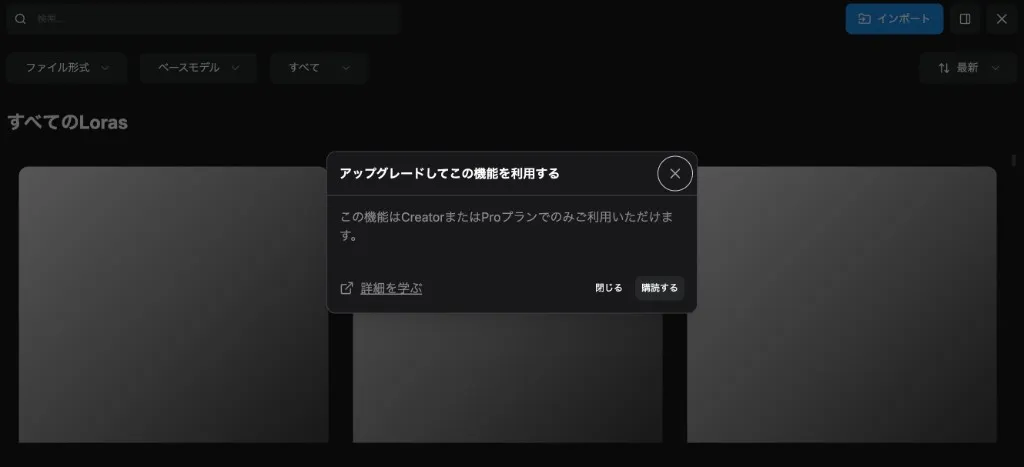
If custom LoRA is your main goal, expect to pay around $35/month for Creator.
Locally, you just drop files into models/loras — much easier for trying lots of things.
You cannot freely install any custom node
Community niche nodes, extensions that shipped yesterday, nodes you patched yourself — local is far faster for that.
Cloud assumes what the platform preinstalled, so it is not great for niche experiments.
You cannot drop in any checkpoint you want
Locally, anything goes in models/checkpoints.
On cloud, you get official models plus a limited import path.
Some items like Hugging Face model import are still marked coming soon — not fully open today.
Hard to curate your own Embeddings and ControlNet
Mixing specific embeddings and ControlNet setups is a local workflow.
Cloud does support ControlNet in some cases, but think within the official environment, not “my full personal library”.
No offline use
No network, no Comfy Cloud.
Local can run fully offline — the only choice for privacy or air-gapped internal use.
Long jobs hit plan time limits
Long video generation and similar work can bump into per-plan duration caps.
Heavy daily use is less stressful on local or your own GPU.
Credits burn quickly
Partner Nodes and video workflows can eat credits fast, not just GPU seconds.
It is easy to burn through half a month’s allowance before you notice — set usage rules early.
Can vs cannot (summary table)
| Item | Local ComfyUI | Comfy Cloud |
|---|---|---|
| Basic image generation workflows | ◎ | ◎ |
| Running official templates | ◎ (may need model downloads) | ◎ (often works immediately) |
| Any checkpoint | ◎ | △ (official plus limited import) |
| Any LoRA | ◎ | △ (Creator / Pro only; Standard cannot import) |
| Any ControlNet | ◎ | △ (preinstalled range) |
| Any embedding | ◎ | △ |
| Niche custom nodes | ◎ | × to △ |
| Self-modified nodes | ◎ | × |
| Partner Nodes | ○ | ◎ (same credits) |
| Offline use | ◎ | × |
| Unlimited runs | ◎ (as long as your GPU holds up) | × (credit-based) |
| Setup hassle | × (you manage everything) | ◎ |
◎ = strong fit ○ = works △ = limited × = mostly not possible
This is based on my own research as of writing — check official pages for the latest details.
Who should use local
I would steer these people toward local:
- You want to try lots of models from Civitai or Hugging Face
- You want to experiment with custom LoRA, ControlNet, and embeddings
- You want to try niche community custom nodes right away
- You batch-generate daily and own GPU beats monthly fees
- You need offline or air-gapped internal use
In short: if you want heavy customization, local is best.
Who should use Comfy Cloud
Cloud fits people like this:
- You do not have enough hardware
- You want to try ComfyUI but hate environment setup
- You mainly want to kick the tires
- Official templates and preinstalled models are enough
- You run Flux or video workflows occasionally, not all day
- $20–$35/month feels reasonable
If you are hardware-limited but can work within official customization (templates, preinstalled models, Partner Nodes), cloud can be enough.
Wrap-up
ComfyUI and Comfy Cloud look almost the same, but the freedom vs cost tradeoff is completely different.
- Heavy customization → local is best
- Underpowered hardware, official scope is enough → cloud works (paid)
- Skip setup / use from anywhere → cloud’s value is real
If you are unsure, start with Comfy Cloud Standard and get a feel for credit usage when you hit Run, plus the customization limits.
If that feels tight, moving to Creator / Pro or local is a sensible next step.
References
- Comfy Cloud official site (affiliate link)
- Comfy Cloud documentation
- Comfy Cloud pricing
- Building a workflow on Comfy Cloud and running it via the API